Gatherer » L'ultime base de donnée des addons Addons et Mods
| Addons » Cartes » Gatherer |
Gatherer
|
Auteur: Norganna (original author); Islorgris (lead dev) (Islorgris)
Note: 10 (689 voteurs) Téléchargements: 2531147 Téléchargements du dernier mois: 9536 7584 utilisateurs l'ont en favoris 
Site: http://gathereraddon.com/
Télécharger
|
| Version | Compatible | Traductions | Téléchargements | Toc | Date | |
| +/- Stables - 1 fichiers | ||||||
| 2.2.2 | en fr de | en fr de | 185616 | 11000 | 03/04/2006 | |
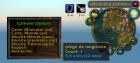
Gatherer Minimap |
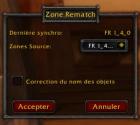
zone rematch (fr) |
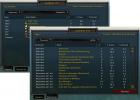
Reports (fr) |
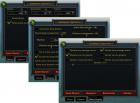
Options (fr) |
Description
Gatherer is a WoW addon for herbalists, miners and treasure hunters. It's main purpose is to track the closest plants, deposits and treasure locations on you minimap.
The addon does not track like a tracking ability does, rather it "remembers" where you have found various items in the past. It does this whenever you gather (perform herbalism, mining or opening) on an item, and records the specific map location in it's history. From then on, whenever the item comes into range of being one of the closest 1-25 (configurable) items to your present location, it will pop up on you minimap (see screenshot here).
Installation:
Installation is easy, simply download the above zip file, and expand it's contents into your World of Warcraft folder. The final path of the files when extracted with full path information should be "World of Warcraft/Interface/AddOns/Gatherer"
Usage:
The usage of Gatherer is fairly straightforward. You simply use the game as normal, and the tracked items will appear in you minimap as soon as you gather them.
There are several configuration options and commands that can be configured via slash commands within the game.
/gather on - turns on the minimap tracking functionality.
/gather off - turns off the minimap tracking functionality. (note, gathering activities are still tracked, even though they do not appear in the minimap)
/gather toggle - toggles the gatherer between on and off states.
/gather dist number - sets the minimap tracking distance to this number of units. (1 unit = 4 seconds of travel)
/gather num number - sets the maximum number of items that will appear in your minimap at once (max 25)
/gather theme name - changes the default icon theme (available themes: original, shaded, iconic; default = shaded)
/gather idist number - sets a pixel distance in your minimap before the icons will change to iconic (default = 40, minimap radius = 60)
/gather herbs (on|off|auto) - select whether to show herb data on the minimap
/gather mining (on|off|auto) - select whether to show mining data on the minimap
/gather treasure (on|off|auto) - select whether to show treasure data on the minimap
/gather options - show/hide configuration dialog
/gather loginfo (on|off) - show/hide configuration info at logon
If you find any bugs, please use the tracker on the sourceforge site (http://sourceforge.net/tracker/?group_id=137353), forums are also available at http://norganna.org/bb/index.php?showforum=8 .
Notes:
The herbs, mining and treasure options are per-character settings (meaning it remembers the settings for each character individually.
The auto setting uses the character's skills to determine whether they should see the herbs or mines. Treasures are always shown when they are on auto.
The Database itself is sharer across all characters.
Modifications de versions
2.2.2 (toc 11000): WARNING: the extraction folder changed this version, extract directly in the Interface\Addons folder
==================
# Bug Fix:
- Tooltips usage should be fixed (ie. no error if you don't have the proper tooltip)
- German localisation: added bloodpetal to list of fixed name, new transition matrix for 1.10.
- French localisation: name for trade skill updated (as per change made in 1.9.3 wow client).
# New:
- Added records for Fishing in nodes: works slightly differently from usual recording.
* First recording method, uses Trunks and Bloated fish to automatically record where you stand (type assigned to Floating wreck, even though it's not always true).
* Second record method, uses the node tooltip, in order to do that, you must autoloot (shift click the bobber) AND move slightly the cursor to make the node tooltip appear.
Fishing categories are: School (all type of school node), Floating Wreckage (include Oil Spill) and Elemental water.
2.2.1 (toc 10900, fix release):
======
# Bug Fix:
- Arthas tear format forced on gathering (zone match, identical source and destination with item fix checkbox selected needed).
- Fix for french Piège à langouste and pousse de pétale-de-sang (zone match, identical source and destination with item fix checkbox selected needed).
- chinese UI localization updated.
- Scrollbars graphic fixed.
- scaling for icon fade under min distance added
- fix name for old Firebloom name included in german item name fix list.
- default value for max distance is now 20 instead of infinite, search limited to current zone.
# New:
- Added iconshade theme, icons are displayed all the time, but shade under min icon distance (40% by default if shade under min distance is set at 100).
2.2.0 (toc 10900):
==================
Edit: German users, there is an extra file for you to download to fix the new zone order and zone match tables, unzip directly inside the 2.2.0 folder (Interface\Addons\Gatherer). You still need to do a zone rematch after that of course (from DE_1_8_0 to DE_1_9_0).
# Bug Fix:
- map delay/freeze problem fixed, brought back max items displayed on world map to 600.
- fixed typo in GathererUI_Lang.lua for zone match (french localization only) with fix item checked.
- added extra convertion of old style quote to standard quote for german version (zone match, fix item checked).
- Silithus scale and offset fixed (courtesy of an unknown contributor on the forum who did the math).
- added extra check to prevent record in pre-instance zones
- zoomlevel (indoors too) taken into account for minimum icon distance.
- Put node icons back under character icon/pointer (minimap)
# Change:
- Mininote tooltips display multiple nodes at the same location.
- Added radius component to minimap icon position.
- Added reset button for filters
- added sub-menu for item filters dropdown (herbs).
# New:
- native In-game Help
NOTE: complete changelog can be found in the readme.txt file included in the archive.
Dépendances
Pas de dépendances
Dépendances optionel: myAddons 2.0
| Plus de langues: | Allemand | Récent en premier | Commentaires par page: |
| « Début | < Précédent 1 Suivant > | Fin » |
en Jeudi, 8 Juin 2006 - 20:14 | |
|
Islorgris |
Re: error message
that's cause by the change in the way tooltip are handled in 1.10 (because you're not seeing the tooltip properly).
|
|---|---|
en Mercredi, 7 Juin 2006 - 17:07 | |
|
roy7 |
Error message
I get this sometimes when picking herbs. It might only be herbs higher level than I can pick, although it doesn't seem to happen on every herb:
|
|---|---|
en Mercredi, 7 Juin 2006 - 00:50 | |
|
Islorgris |
German Users
just a reminder that, if there has been any change in the zone names on the public test realms, this should be reported before the patch goes live (unless you really want to experience again zone data being incorrect when the 1.11 patch goes live). |
|---|---|
en Lundi, 5 Juin 2006 - 17:44 | |
|
Islorgris |
Re: Montain sage rename in Franch version
already fixed in 2.3 dev version. |
|---|---|
en Lundi, 5 Juin 2006 - 09:48 | |
|
EViollet |
Montain sage rename in Franch version
Hi.
|
|---|---|
en Mercredi, 31 Mai 2006 - 12:34 | |
|
Islorgris |
Re: Various
@Kal_Zakath13:
|
|---|---|
en Mercredi, 31 Mai 2006 - 10:46 | |
|
Noelz |
Problem
I kinda having problems with reading the % Node and % Density.
|
|---|---|
en Dimanche, 28 Mai 2006 - 23:32 | |
|
Zigajutar |
Compatible with Metamap?
As u can suggest by the title: Is Gatherer compatible with the Addon Metamap? :)
|
|---|---|
en Samedi, 27 Mai 2006 - 09:04 | |
|
Pakka |
Confirm "stalker" nodes
@Kylinee
|
|---|---|
en Samedi, 27 Mai 2006 - 07:14 | |
|
Molebomb |
minimap not working.
When using gatherer, I think it was right before Wow Patch 1.07, the nodes on the minimap stopped working. I haven;t been able to get them to work ever since. Thoe only mods i have are CT(all) and a couple of misc mods for equipment and dmg statistics. I was wondering if there was some sort of conflict with one of my mods or if there was some change in the recent version of gatherer that i needed to setup to make the node appear on my minimap, I have minimap [on] herbs[auto] the nodes still show up on my world map but not on my minimap, any suggestions? |
|---|---|
en Vendredi, 26 Mai 2006 - 16:01 | |
|
Kylinee |
nodes "following me"
a couple times recently i've been running through a zone, stop to pick up a flower, and the node has "followed" me across the zone. (i'm running with a green circle around my arrow) i'm not really sure what causes it, i'm wondering if anyone else has seen this issue. |
|---|---|
en Jeudi, 25 Mai 2006 - 01:34 | |
|
Kal_Zakath13 |
Tooltip
Is it possible to change the tooltip? I have my minimap moved to the left side of the screen, and the tooltip goes off the screen where I can't read it. |
|---|---|
en Mercredi, 17 Mai 2006 - 11:36 | |
|
Islorgris |
Re: Datasharing / Exploit
please do not post such links (or I'll regretfully have to remove Gatherer from Curse).
|
|---|---|
en Mardi, 16 Mai 2006 - 19:47 | |
|
ryanhamshire |
Suggestion : Data Sharing
I have a suggestion. I noticed that you mentioned about using other players' data files to get information about where to find nodes. I would like to suggest an additional function for the mod which would allow players to share their data in-game. For example, the addon might tune in to a custom channel on sign in and send out a message on that channel requesting updated information. Then other players who are running the gatherer addon would receive that message and would automatically reply in /tell. The first /tell message to be received by the requesting gatherer would be the would be the one with which it would trade all of its info in exchance for all of the other's info. Eventually, through successive logins over the course of time, any user with gatherer installed would build up a database not only of nodes they had themselves discovered, but also of many that others have discovered through this method. It could be further modified to produce better results - for example it might look at the first 5 /tell responses it received after its initial request, and pick the one that has the largest database to trade. Following this sort of method would allow the gatherer installed at a particular client to get a little bit of free data at the beginning of each session, which could later be shared with others. |
|---|---|
en Lundi, 15 Mai 2006 - 17:06 | |
|
Johnson |
Exploit the Gatherer Mod
Found this at http://www.multiplayerstrategies.com/wow/index.cfm?aco... |
|---|---|
en Vendredi, 12 Mai 2006 - 16:43 | |
|
Islorgris |
Re: bugged with gatherbook
Gatherbook is no longer developped and for that matter hasn't been supported for more than 10 months and will not be supported again anyway.
|
|---|---|
en Vendredi, 12 Mai 2006 - 08:53 | |
|
wildlife |
bugged with gatherbook
i hv tried combining the data from gatherbook into gatherer. a few herbs were able to display but most of the herbs are not displayed. is there any part that i did wrong?
|
|---|---|
| « Début | < Précédent 1 Suivant > | Fin » |