KLHThreatMeter | World of Warcraft @ Curse
KLHThreatMeter
- About
- Changes
- How to Install
- Hits Today
- 14,305
- Downloads Total
- 4,118,987
- Favorites
- 12,601
- Creation Date
- 2006/03/01
Click to enlarge
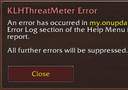
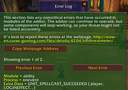
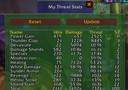
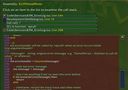 Code Inspection at runtime
KLHThreatMeter
KLHThreatMeter is like a damage meter, except it records your threat. By monitoring all the abilities you use and checking your talents, armour set bonuses and buffs, the addon can recreate the threat list of a mob. This makes tank transitions simple, and allows DPS to maximise their damage without pulling aggro.
Note: due to the intricacies of threat, it is only possible to accurately determine your own threat, because you don't know what talents other players are using; also some abilities can only be detected by the player who uses them. Therefore everyone in your party or raid group needs the addon installed to have their threat appear on the table. In practice only the tanks and DPS need to have the addon, healers might use it to check upcoming tank transitions or warn DPS who are going too high.
KTM FAQ
1) List of Contents:
1) List of Contents - this section
2) Prerequisites - what you need to read this guide
3) Audience - who should read this guide
4) Troubleshooting - when KTM isn't loading at all
5) Last Resort - If all else fails...
6) Running Issues - Questions and issues about KTM's operation
2) Prerequisites
The following are required to use this guide:
a) Ablity to read English
b) Ability to operate pointing device and/or keyboard on your computer
c) Ability to follow simple instructions
The following are optional requirements:
d) Sense of honour.
3) Audience
Who should be reading this guide?
a) People who can't get KTM working.
b) People who have a question about KTM, but don't want to get abused for asking something that's been asked and answered several times already.
Who shouldn't be reading this guide?
a) People whose KTM is working fine.
b) Illiterate people.
c) People who have never heard of KTM.
d) People i don't like.
4) Troubleshooting
This is a step-by-step troubleshooter. Answer the questions in order, and read the text after corresponding to your answer. For example, if you answered "Yes" to the question, read the text after "Yes:" following the question.
Question 1: Is your screen all blank?
Yes: Turn your monitor on.
No: Continue to Question 2.
Question 2: Is KLHThreatMeter showing up in your Addons screen?
Yes: Skip to Question 4.
No: Continue to Question 3.
Question 3: Type the location "C:\Program Files\World of Warcraft\Interface\Addons\KLHThreatMeter\Code" (not the quotes) into the Address bar of your browser and press Enter. Is the folder located?
Yes (I see a folder with some KTM_... files): Continue to Question 4.
No (There is an error / folder not found): Extract the .zip file in the \Addons folder so that the above folder exists.
Question 4: Is the box on the left of KLHThreatMeter in the Addons screen filled with a gold tick?
Yes: Continue to Question 6.
No (There's a grey tick, OR it's empty): Click the box until there is a gold tick in it.
Question 5: Are you bored yet?
Yes: Continue to Question 6.
No: Continue to Question 5.
Question 6: Is there red text "Addon is out of date" next to KLHThreatMeter in the addons screen?
Yes: Click the "Load out of date Addons" checkbox in the top right corner of the screen.
No: Continue to Question 7.
Question 7: Login to World of Warcraft. Type "/ktm" without the quotes and press enter. Do you see a list of KTM commands?
Yes (there are a list of /ktm commands): Continue at Question 10.
No (i get the message "type /help for a list of commands"): Continue at Question 9.
Question 8: There's no question that leads to Question 8! Are you just reading through these in order and not following the directions?
Yes: I suppose i can't stop you. On you go to Question 9.
No: Now would be a good time to read the "Last Resort" section.
Question 9: Copy this text (without quotes) and paste it as a WoW chat message: "/script ChatFrame1:AddMessage(tostring(klhtm == nil))" and press enter. Is the message "false" printed?
Yes: See Section 5: Last Resort :( .
No (it says "true" instead): There was an error in KTM's loading. Report this in the KTM discussion thread for further help!
Question 10: Is the window lost / missing?
Yes: Continue at Question 11.
No: Continue at Question 12.
Question 11: Run these commands (without quotes) "/ktm g s", then "/ktm g r". Did that fix the problem?
Yes: Continue to Question 12.
No: See Section 5: Last Resort :( .
Question 12: What's the problem? It looks like everything is fine!
Yes: Continue to Question 13.
No: Continue to Question 13.
Question 13: What do you mean yes / no? It was a rhetorical question!
Yes: Continue to Question 14.
No: Continue to Question 14.
Question 14: GRRRR! You're enjoying this, aren't you?
Yes: Continue to Question 15. Yes, Question 15! Who's laughing now?
No: Then stop reading! Sheesh!
5) Last Resort
If worst comes to worst, you can always try deleting your current \Addons\KLHThreatMeter directory, then reinstalling and trying the Troubleshooting section again. This can reveal some directory problems.
Failing that, it's most likely that you haven't read the instructions properly, in which case i can recommend one or more of the following:
a) Beating your head against a wall. It needs it.
b) Going back to Freecell. You're not ready for the complexities of WoW it seems.
6) Running Issues
(coming soon)
The Master Target
Often in fights there are several mobs active, but only one is important for threat considerations, for example a boss and his adds. You can specify that only threat against one specific mob will be recorded by setting a master target. To do this, target the important mob and click the master target button on the main window (it looks like the hunter's mark icon). You should see the name of the mob in the top line of the header frame.
To remove the master target, clear your target then press the master target button again. For most boss mobs the target will be cleared automatically on death, but sometimes it is necessary to do it manually.
Note: only the group leader or raid assistants can set the master target.
Graphical Interface
The main window has two parts: the header, which holds the buttons and basic information, and the table, which shows the threat list.
Note: currently you can only move the window by dragging the header, not the list part.
You can minimise the window, which hides the threat list. Then you will see only the name of the master target, your position in the threat list (e.g. "3 / 10") and the buttons. Click the options button to bring up the help menu. Here you can change many options about the frame's colour scheme and layout.
Command Line Interface
Not all commands are currently available from the Help Menu or main window. To access the command line interface, type /ktm (or also /klhtm or /klhthreatmeter). This will print a list of commands and subtopics. Type the command as printed for more help.
Note: all commands can be abbreviated as much as possible as long as they are still distinguishable. Instead of "/ktm test threat" you can type "/ktm t th". The shortcuts are indicated by the first few letters of each command which are light blue.
Localisation
As new abilities, items and boss encounters are regularly being added to the game, the localisation files need frequent updating for KTM to work well in all locales. The addon is currently localised for English (enUS), French (frFR), German (deDE), Spanish (esES), Simplified Chinese (zhCN), traditional Chinese (zhTW) and Korean (koKR). However not all localisations are up to date.
In particular Chinese and Korean localisations are a bit behind, the others are mostly good. Any updates would be greatly welcomed.
Work In Progress
In The (maybe distant) Future
The ultimate goal is to have multiple master targets, arbitrarily many. Each would have a separate threat list and a separate window (the last is possible already).
Then i'd like to eliminate the command line interface in place of the new help menu.
- Downloads
| File | Game Version | Hits/Total | Last Update | |
|---|---|---|---|---|
| Download Report | 20.3e | 2.1.3 | 7,895 | 2007/08/17 |
| Download Report | (20.3d) | 2.1.3 | 12,236 | 2007/08/11 |
| Download Report | 20.2 Stable | — | 459,285 | 2007/07/23 |
- Thumbs Down
- Thumbs Up
- +0
MarcinTechweenie - I experienced something like you describe about a year ago. It was caused by a completely unrelated, inactive and outdated addon. I recommend a complete cleanup of the addon directory and maybe the saved variables too. For a test you can simply rename the addon dir and try with KTM alone.
- Thumbs Down
- Thumbs Up
- +0
clamcrusherI saw in your "a guide to threat" that hamstring was listed as having 181 base threat. Is there a reason why this ability is not tracked in this mod? I could not find the substring "hamstring" in any data files, nor does the mod appear to add threat to hamstring when being used.
- Thumbs Down
- Thumbs Up
- +0
Kencoelhana,
added 20.3e which i can confirm works with RoS now. However the mt suggestion won't be accepted by people with older versions, so DPS people in particular are recommended to upgrade. 20.3e seems fairly stable.
shawny,
try opening the layout subsection in the raid section of the helpmenu, then run the command
/script klhtm.menuraidtable.layoutframe.slider2:SetMinMaxValues(40, 200)
hopefully you can move it up the end of the slider and fix it after that. After your reload Wow, don't move the slider any.
woo-sang,
i'm not convinced that the final lifebloom threat is going to the healer. KTM just reads it as it comes from the combat log, and it's written as sourced by the person being healed. Furthermore the implementation would be too much trouble, and the potential error in threat is too small for me to change it.
oathblade,
OK, i don't know about that ability so i'll have to look into it. There was a mention of Kill Command in the 2.2 patch notes, do you think that will affect this issue?
Suhov,
Misdirection is working fine. Perhaps you could be more specific?
techweenie,
If you are having a noticeable slowdown, KTM isn't causing it. I suggest you check other addons that might be interacting with it or use a profiler.
- Thumbs Down
- Thumbs Up
- +0
elhanatechweenie: Do you just hide the window or disable addon to stop fps spikes? Which version are you running? Which other addons are you using? Does it happens only in raid or solo too? If it happens solo aswell, can you check if KTM running alone still spikes your fps?
I've never noticed such pauses even on my second box: p4 2.8 with 1 Gb ram.
- Thumbs Down
- Thumbs Up
- -1
techweenieI have 2GB dual channel ram and only about 60% of it used while wow is running. The problem is the mod. However, I did find that if I hide the window the lag disappears.
- Thumbs Down
- Thumbs Up
- +1
Elvenelfadd more ram!?
- Thumbs Down
- Thumbs Up
- -1
techweenieThis mod is insanely cpu intensive. It causes wow to lag so bad I end up disabling it. Every time some random event, such as a guild member signing on(!) or changing targets happens, the game will pause for a split second. If I disable klh the problem goes away. My machine is no slouch either. It's a dual core Athlon 64 3800. I have used a feature of the fubar plugin peformancefu to confirm that klh is hogging all the clock cycles. Isn't there some way to optimize the code so the frequent pauses don't happen? It really doesn't matter if it's using 70% cpu time as long as the pauses are gone.
- Thumbs Down
- Thumbs Up
- +1
johtroGot a feature request for this very good addon : Sometimes I have seen that Mastertarget can be stuck after leaving a party/raid. If I then joins a party / Raid where the Raidleader / Promoted doesnt have KTM or dont know how to set / reset Mastertarget then the threatlist will be all screwed up, since those with a MasterTarget will only register/transmit the global threat. So my request is that KTM mastertarget gets reset everytime you leave ( and joins) a raid / party.
- Thumbs Down
- Thumbs Up
- -3
vatoskyShow some respect, hobbit.
- Thumbs Down
- Thumbs Up
- +1
funkydudeoktav shut the hell up you troll
Avoid this mod, go on better ones, like Omen or other threat-1.0 compliant mods
- Thumbs Down
- Thumbs Up
- +2
SuhovWhy KTM is still immun to hunter's Missdirection?
- Thumbs Down
- Thumbs Up
- +0
KencoAdded new beta version with reliquary stuff and threat debuff fixes. ID = 37553 for download.
- Thumbs Down
- Thumbs Up
- +1
oathbladeThere seems to be a problem withthe hunter Kill Command. Ether it isnt registering the full threat or it isnt registering the crit threat, im not sure which. I pull agro off tans when my threat bar is below them and they start yelling at me for using my (off) growl.
- Thumbs Down
- Thumbs Up
- +0
DuncanMcCloudThis post (though a bit older) by Whiteknight seems to back that up somewhat. Didn't hear a lot about that issue for a while, but i was under the impression that Lifebloom would really attribute threat to the target (similar to the discussion about ES and PoM - was that settled yet?). So much for hearsay?
http://elitistjerks.com/f31/t9258-kenco_guide_threat/post297244.html#post297244
- Thumbs Down
- Thumbs Up
- +0
woo-sang20.2: KTM is giving wrong threat for Lifebloom. KTM gives correct the caster threat for the hot effect. However, the threat of the end effect is giving to the person buffed with Lifebloom. Our research indicates that no threat should be applied. Thanadin and Woosang @ EU Bloodhoof, Alliance.
Note: Thanks for a great addon.
- Thumbs Down
- Thumbs Up
- +0
CrimsonYoshiJust fyi, I downloaded 20.3d and it seems to be working just fine, I don't know what was going on with 20.3c or b but d is working fine.
- Thumbs Down
- Thumbs Up
- +0
shawnyIs it possible to make the threat window/font any larger then the 130% scale you've made available?
I play in a large resolution to make the most of my screen, but some important windows are just to small at that res so i need to enlarge them to see better. Any ideas on waht i can do, please let me know.(other then drop my res down)
- Thumbs Down
- Thumbs Up
- +0
holymansI find your mod extremely useful! Thanks for all your hard work. I wonder if it would be possible to combine this mod with the functionality of TitanAggro (for example this mod sends out notifications when you lost aggro and mob aggroed a specific class). If one could assign that only tanks are supposed to be at the top of the aggro list and whomever exceeds that aggro gets a tell saying "watch your aggro" that would be wonderful.
Thanks
- Thumbs Down
- Thumbs Up
- +0
elhanaReliquary of Souls: Fight is 3 phases, each phase has it's own name. There is some silly trash mobs running in between phases. Essence of Suffering(p1) has weird aggro mechanics - you can check it on wowwiki, so threatmeter is useless; for the 2nd and 3rd phase I set mastertarget and clear threat. Their yells at the phase start:
Essence of Suffering yells: Pain and suffering are all that await you!
Essence of Desire yells: You can have anything you desire... for a price.
Essence of Anger yells: Beware: I live!
edit: mastertarget needed for phase2 only I belive due to "Your Aura of Desire hits you for 272 Shadow damage.", but I just use a macro to set MT, reset threat
Add Your Comment